
Stop Building Email Campaigns Manually
Plus, 💪 How to run cross-app ai workflows without leaving slack with WorkClaw, and more!


Hola Decoder😎
If someone forwarded this to you and you want to Decode the power of AI and be limitless, then subscribe now and Join Decode alongside 30k+ code-breakers untangling AI.
Together with Dreem
The Wait Between Upload And Launch Just Disappeared
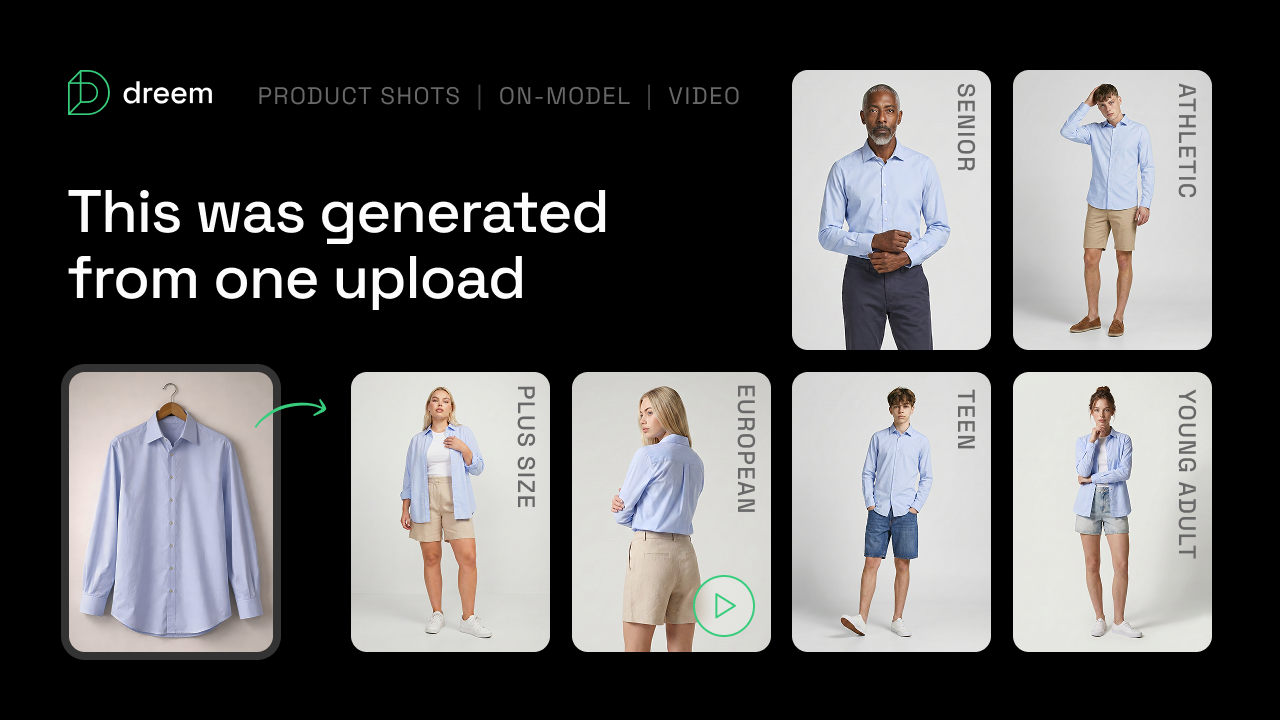
You upload a photo, and then you wait. A few days later it finally turns into something you can actually use, and that wait is the real cost here, not the shoot itself.
Every SKU needs assets across segments, channels, and formats. Most teams ship one shot and call it a launch, then stretch it for a year because nobody has six weeks to wait on samples and reshoots.
Dreem closes that wait. One upload and you get model shots, product shots, and video across 400+ virtual talents, for about $2 an image.
- One upload becomes every shot you need: model, product, and video, from a phone photo or flat lay, no studio required.
- Pick from 400+ talents across body type, age, and skin tone, so the shopper browsing actually sees someone who looks like them.
- A new SKU goes from flat lay to live page in a single day. No shoot scheduling or sample shipping.
CX teams use this to cut return tickets by showing real fit before the purchase. Growth teams ship 15+ audience-specific variants per launch.
Sign up before July 30 and you get 600 bonus credits, enough for 50 full per-segment kits on your top SKUs.
💪How to Let AI Build and Optimize Your Email Campaigns Inside Omnisend
Most AI marketing tools summarize data. Omnisend lets your AI act on it. Here's how to connect them.
Step 1: Connect Omnisend to Claude or ChatGPT - Link your Omnisend account to your AI tool via the MCP connector. Your AI now has live read and write access to your actual account data.
Step 2: Ask what's driving revenue - Type a plain-language question. "What drove revenue this week?" Your AI pulls the real breakdown directly from your Omnisend data — no exporting, no dashboard switching.
Step 3: Find the gaps in your campaigns - Ask your AI to audit your automations. It reads your live account, identifies what's underperforming, and tells you exactly where revenue is being left on the table.
Step 4: Build campaigns on command - Say "build a re-engagement campaign for lapsed buyers." Your AI drafts the segment and the email inside Omnisend — ready to review and send. No manual setup.
Step 5: Migrate for free if you're switching - Omnisend migrates your lists, campaigns, and automations from your current platform for free. Done in 5 days flat.
$79 returned for every $1 spent across 150,000+ brands. Up to 35% less than competing platforms. You can connect Omnisend to your AI now.
How to Run Cross-App AI Workflows Without Leaving Slack With WorkClaw
Your AI agent shouldn’t live in a separate tab. WorkClaw puts collaborative AI coworkers directly inside Slack and Teams.
Step 1: Install WorkClaw in Slack or Teams - Add it from the app directory. WorkClaw shows up as shared AI coworkers your entire team can interact with, not just you.
Step 2: Assign a task in plain language - Type what you need in any channel or DM. WorkClaw connects to your existing tools, CRM, Notion, GitHub, calendar, and executes across all of them from one message.
Step 3: Share coworkers across your team - Unlike personal AI assistants, WorkClaw’s agents are shared. Anyone on the team can assign them tasks, see what they’re working on, and pick up where someone left off.
Step 4: Set governance rules - Control what each AI coworker can access and what requires human approval before it acts. Audit logs track every action taken.
Step 5: Let it run proactively - WorkClaw monitors your connected tools and surfaces what needs attention, blockers, pending items, and cross-app updates, without you asking. You can try WorkClaw here.
Together with Playbook Pro
Your Next 1,000 Customers Are Already Here

Pouring more money into ads won’t fix flat growth. The real leverage is hiding inside the customers you already have, and every day you wait, that momentum leaks away.
Networked Growth Engines is the 26-page field guide built from 200+ hours of research and real brand wins. It gives you ready-to-use systems you can plug in this week, no giant team or budget required. With it, you can:
🔥 Spark self-propelling communities using the Community Building Playbook, exactly how Nyfter built a 500,000-member Discord that drives product innovation.
📈 Design referral programs that fund themselves with the Referral ROI Calculator, the same loop that powered 34% of Blue Apron’s customer acquisition and delivered a 17.3× ROI for Latico Leathers.
🤝 Form trust-based partnerships fast using the Partnership MoU and 50-template Outreach Library to unlock new audiences without paid ads.
Your current customers are the growth engine.
Download the guide today and start compounding growth before another week of ad spend vanishes.
🏆 Tools you Cannot Miss:
🎨 Deep Dream Generator – Gives access to 30+ AI models for generating images and videos from leading providers in one platform.
🎤 Deep Beat – Generates AI-powered rap lyrics to help artists brainstorm verses and punchlines.
✍️ AI-Writer – Produces accurate, research-backed written content in minutes for blogs, articles, and reports.
🤖 H2O.ai – Combines predictive analytics with generative AI to build enterprise-grade AI applications and workflows.
🛡️ Riskified – Protects ecommerce businesses from fraud across login, checkout, refunds, and returns with AI-powered risk analysis.
🧩 Prompt of the Day
Understand Taxes Without Becoming a Tax Expert
Most people treat taxes as a once-a-year headache. Understanding the basics of how your income is taxed helps you keep more of what you earn and avoid expensive mistakes.
Turn taxes into a financial advantage instead of a source of stress.
Paste the prompt: Drop this into ChatGPT, then fill in your tax details.
Prompt to paste
Explain my tax situation based on my [Insert employment type], [Insert tax situation], [Insert tax goal], and [Insert filing status]. Break down how my income is taxed, what deductions or credits may apply, and the most common mistakes people in my situation make. Explain everything in plain English with practical examples, recommend legitimate ways to reduce my tax bill, and provide a simple checklist to help me prepare for filing and stay organized throughout the year.
🧩 Prompt of the Day
Internal Newsletters Employees Actually Want to Read
Most internal newsletters feel like corporate announcements. The best ones combine important updates with real stories, recognition, and a consistent editorial voice that keeps people engaged.
Turn internal communication into a culture-building habit.
Paste the prompt: Drop this into ChatGPT, then fill in your company details.
Prompt to paste
Write an engaging internal company newsletter for a [Insert company size and stage]. Include [Insert key updates] while maintaining a [Insert tone goal] throughout. Structure the newsletter with an engaging opening, company news, team or employee spotlights, wins, upcoming events, and a closing message that reinforces company culture. Tailor the content for a [Insert cadence] publication and make it informative, human, and genuinely enjoyable to read rather than sounding like a corporate bulletin.
🤳AI Nugget of the Day
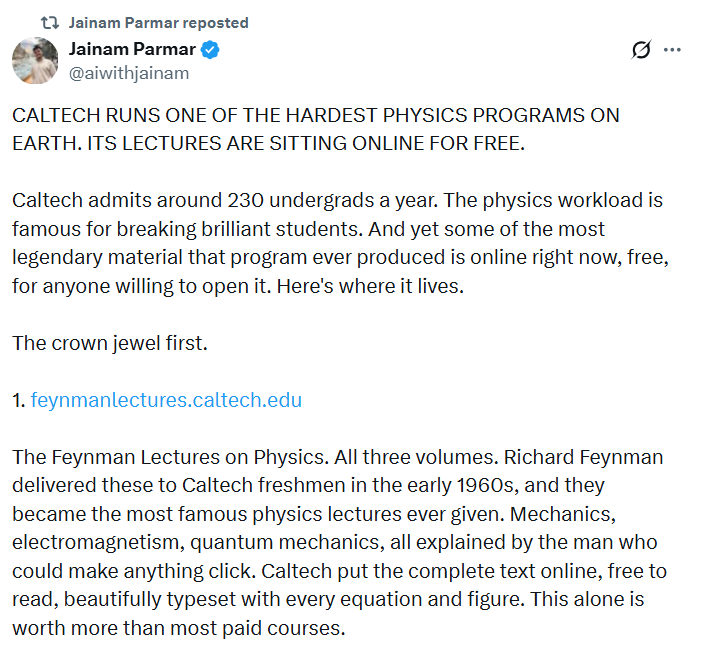
Thanks for Decoding with us🥳
Your feedback is the key to our code! Help us elevate your Decode experience by hitting reply and sharing your input on our content and style.
Keep deciphering the AI enigma, and we'll be back with more coded mysteries unraveled just for you!